Huxley Theater at NY State Museum: Specs & Venue Details
Explore verified specs, audio-visual capabilities, and seating details for the Huxley Theater at the New York State Museum in Albany, NY.
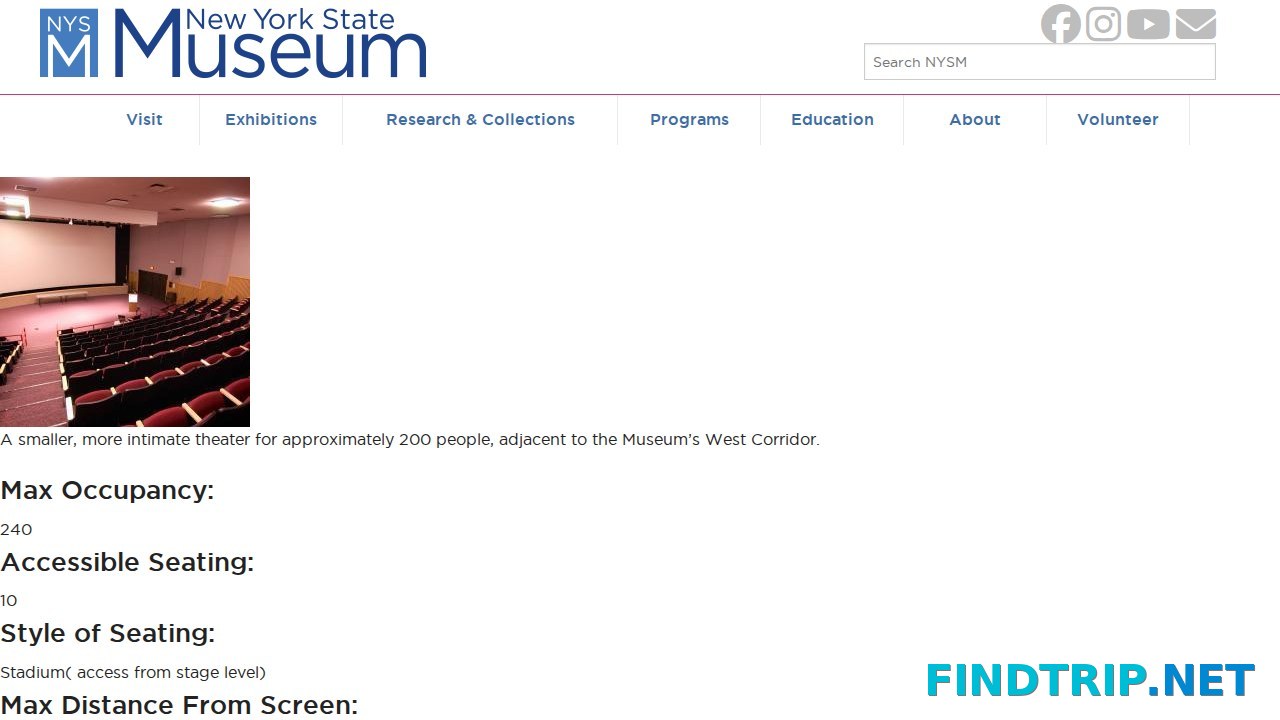
Planning an event, lecture, or presentation requires precise technical data and venue specifications. Located within the Cultural Education Center in Albany, New York, the Huxley Theater serves as an intimate performance and presentation venue attached to the New York State Museum.
This guide provides an objective, fact-checked summary of the Huxley Theater based strictly on official documentation published by the New York State Museum. Rather than offering subjective personal reviews, this document compiles verified technical specs, audio-visual capabilities, and clear layout information, while explicitly highlighting details that require direct confirmation from museum staff.
---
1. Verified Specifications and Features
The following details are directly documented by the New York State Museum facility rental guidelines and official specifications.
Capacity and Seating Layout
- Maximum Occupancy: 240 people (designed as an intimate theater space typically hosting around 200 guests).
- Accessible Seating: 10 dedicated accessible seats.
- Seating Style: Stadium-style seating with entry access positioned at the stage level.
- Public Access Location: Accessible directly from the 1st Floor / West Gallery adjacent to the museum's West Corridor.
Display and Projection Technology
- Screen Size: 424-inch diagonal (16:9 ratio) curved screen.
- Maximum Viewing Distance: 58 feet from the screen.
- Projector Setup: 2 Epson 1080p Stacked Projectors housed inside a dedicated projection booth.
- Control Unit: Mix station with control capabilities located directly at the podium.
Audio and Lighting System
- Lighting: Dimmable house and stage lights (configured for wash lighting only).
- Wireless Microphones: 4 channels available (handheld and lavalier options).
- Wired Microphones: Inventory of up to 10 wired microphones (subject to overall availability across museum events).
- Conference Calling: Technical support for up to 4 remote call members.
Supported Media Formats and Connectivity
- Physical & Digital Formats: DVD, CD, Blu-Ray, MPEG, AVI, ASF/WMV/WMA, MP4/MOV/3GP, OGG/OGM, MKV, WAV, Raw Audio (DTS, AAC, AC3/A52), FLAC, FLV, MXF, and Microsoft Office Suite files (v.2010 or older).
- Video/Audio Interfaces: 1 HDMI input, 1 VGA input, 1 USB input, 20 XLR inputs, 1 3.5mm input, and 4 1/4-inch phone outputs.
- Network Connectivity: Restricted LAN access and Public Wi-Fi (with streaming access for platforms like YouTube and Vimeo).
---
2. Unverified Details and Missing Information
To maintain strict accuracy, event organizers should note that several practical operational details are not specified on the official venue listing page. These missing elements must be confirmed directly with the museum's facility rental team prior to booking:
- Rental Rates and Pricing Tiers: Not listed on the source page. Fee structures for non-profit, government, or private events are not provided.
- Direct Booking Phone Number: Not listed on the source page. No direct phone line for the theater manager is published on the venue spec sheet.
- Dedicated Theater Operating Hours: Not specified. While the general museum hours are listed as Tuesday through Sunday, 9:30 AM – 5:00 PM (closed state-observed holidays), event availability outside standard public hours is not detailed.
- Catering and Food/Beverage Policies: Not listed on the source page. Rules regarding food, beverages, or approved vendor lists are omitted from the technical guide.
- Dedicated Parking & Load-in Facilities: Not specified. Specific loading dock dimensions, freight elevator dimensions, and parking fee structures for event organizers are not listed.
---
3. How to Verify Information and Plan Your Event
Because technical availability and venue guidelines can change based on museum programming, prospective clients should follow these steps to verify information safely:
1. Visit the Official Portal: Access the official New York State Museum website (`nysm.nysed.gov`) and navigate to the Facility Rentals section.
2. Submit a Direct Inquiry: Use the official facility contact forms provided by the New York State Education Department to request current pricing, rental contracts, and availability.
3. Confirm A/V Equipment Availability: Request written confirmation regarding wired microphone inventory and technical staff support, as equipment is shared across multiple museum spaces.
4. Avoid Third-Party Estimates: Do not rely on third-party event blogs for venue pricing or capacity promises, as room configurations and state regulations are subject to administrative updates.
---
4. Final Summary
The Huxley Theater at the New York State Museum is a well-equipped, medium-capacity venue tailored for lectures, film screenings, corporate presentations, and educational seminars. Featuring a 424-inch curved screen, stacked 1080p projection, and comprehensive audio inputs, it offers modern presentation capabilities in an accessible stadium layout.
Use this guide as an initial informational reference. Before making financial commitments or publishing event announcements, always contact the New York State Museum directly to verify pricing, policy terms, and scheduling availability.
---