Digital Access and Mobile Banking Solutions for Community Bank in Fillmore, NY
Explore mobile app features, online banking options, and branch services for Community Bank in Fillmore, NY (44 West Main Street). Learn safe digital banking tips.
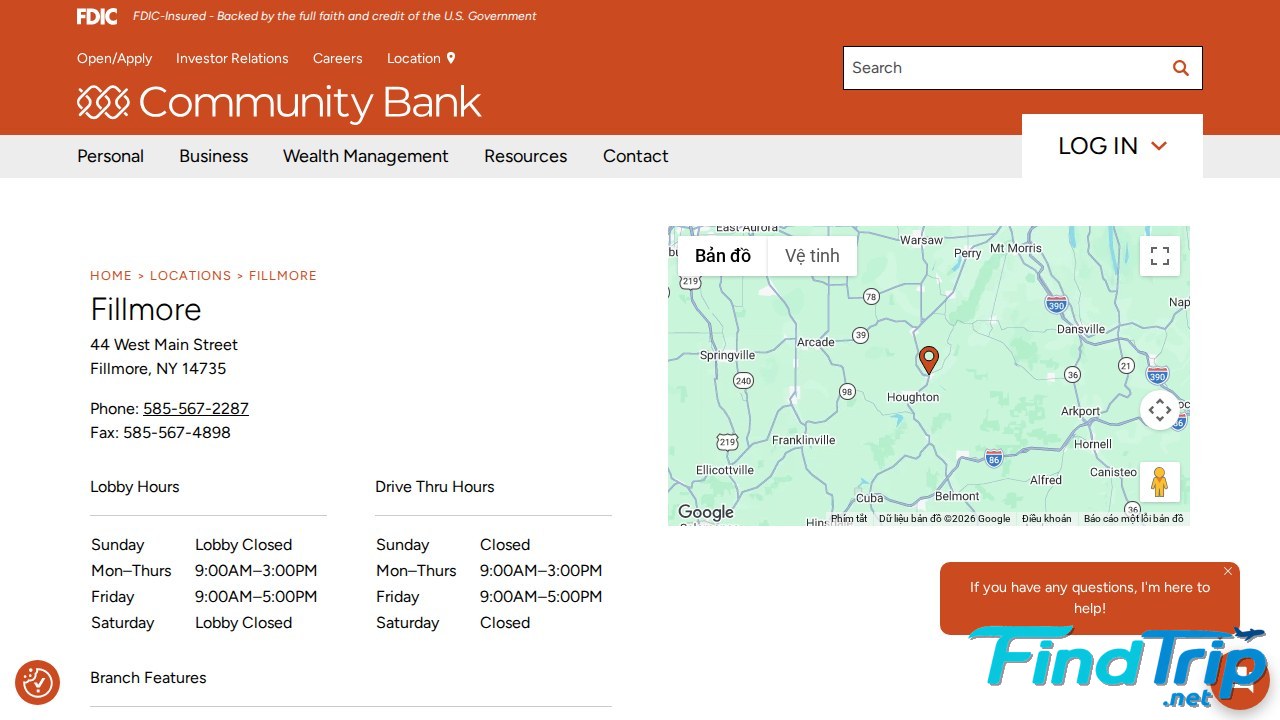
Managing daily personal or business finances requires flexible access to your accounts. For local residents and business owners in Fillmore, New York, Community Bank, N.A. offers a hybrid banking experience that pairs traditional branch services with modern online and mobile capabilities. Whether you regularly visit the physical branch at 44 West Main Street, Fillmore, NY 14735 or prefer managing funds entirely on your smartphone, understanding how to navigate the institution’s digital ecosystem helps you decide which access methods best fit your daily routine.
This guide provides a comprehensive overview of mobile app availability, core digital features, scenarios where browser-based web banking is sufficient, and critical security best practices when accessing your Community Bank accounts remotely.
---
Mobile App Availability and Digital Access Options
When managing your accounts remotely with Community Bank, official mobile banking applications are available for major smartphone platforms, including iOS and Android. Designed to mirror core features available through online banking at `cbna.com`, the official mobile app serves as a portable portal for personal and business account holders alike.
For account holders near Fillmore and surrounding Allegany County communities, mobile applications provide an immediate alternative to in-person branch visits. Rather than driving to 44 West Main Street during traditional operating hours, users can review balances, monitor recent ledger transactions, and transfer money between linked deposit accounts straight from their mobile devices.
```
+-------------------------------------------------------+
| COMMUNITY BANK DIGITAL PLATFORMS |
+-------------------------------------------------------+
| |
| [ Mobile App ] [ Desktop Web Browser ] |
| - iOS App Store - Portal: cbna.com |
| - Google Play Store - Full Account Setup |
| - Quick Balance & Deposit - Complex PDF Downloads |
| |
+-------------------------------------------------------+
|
v
+-------------------------------------------------------+
| FILLMORE PHYSICAL BRANCH |
| Address: 44 West Main Street, Fillmore, NY 14735 |
| Features: Drive-Thru, Safe Deposit Box, Night Drop |
+-------------------------------------------------------+
```
While the app provides convenience, verify that you are connecting to official platforms backed by Community Bank, N.A. (Member FDIC). If you ever have questions regarding software compatibility, account enrollment, or app authentication procedures, local representatives at the Fillmore branch can be reached directly by phone at 585-567-2287 or via fax at 585-567-4898.
---
Primary Functions and Capabilities of the Community Bank App
The official mobile app from Community Bank focuses on streamlining high-frequency transactions and routine financial checks. Instead of sitting down at a desktop or traveling to a local teller window, account holders can execute several key functions within a few taps.
1. Account Monitoring and Real-Time Ledger Tracking
Users can instantly view checking, savings, certificate of deposit (CD), and loan account balances. Real-time transaction history helps account holders spot pending charges, verify direct deposits, and keep track of cleared debit transactions.
2. Remote Check Deposit
One of the most practical features for mobile users is Remote Deposit Capture (RDC). By capturing clear images of the front and back of a properly endorsed paper check using a smartphone camera, customers can submit deposits directly into their designated checking or savings accounts without stepping into a branch.
3. Fund Transfers and Bill Pay Services
The mobile platform enables immediate internal transfers between connected Community Bank accounts. Additionally, built-in bill payment functionality lets users schedule one-time or recurring payments to utility companies, service providers, and credit card issuers, keeping track of due dates effortlessly.
4. Card Controls and Security Alerts
Modern mobile apps from financial institutions frequently include debit card management tools. Users can temporarily lock mislaid debit cards, set custom spending alerts, or restrict international transactions to protect funds against potential fraud.
5. Local Branch and ATM Locator
When physical banking services become necessary, the integrated location tool helps users locate the nearest branch address, drive-thru hours, or fee-free ATM network. For instance, users traveling through Western New York can quickly confirm location details for the Fillmore location at 44 West Main Street.
Checklist of Common Tasks: Mobile App vs. In-Branch Services
| Task / Financial Activity | Mobile App Capable? | Requires Fillmore Branch Visit? |
| :--- | :---: | :---: |
| Balance Inquiries & History | Yes | Optional |
| Internal Account Transfers | Yes | Optional |
| Mobile Paper Check Deposit | Yes | Optional |
| Safe Deposit Box Access | No | Yes (44 West Main St) |
| Large Cash Withdrawals | No | Yes (Drive-thru / Lobby) |
| After-Hours Drop Box Submissions | No | Yes (Night Drop Box) |
| In-Depth Mortgage Consulting | No | Recommended (Contact Local Staff) |
---
When Web Banking or Branch Services Are Sufficient Without the App
While smartphone apps offer undeniable convenience on the go, downloading mobile software is not mandatory for every Community Bank customer. Depending on your routine, standard online web access through a computer or direct visits to the local branch in Fillmore may fulfill all your financial requirements.
Why Web Browser Banking (`cbna.com`) May Be Preferred
For users who perform extensive financial management or prefer working on larger screens, full web browser access offers distinct advantages over mobile applications:
- Detailed Financial Management: Business owners and individuals managing multiple business accounts or complex commercial loans often find full-sized keyboard and monitor setups more efficient for data entry.
- Document Downloading & Tax Preparation: Downloading multi-page bank statements, end-of-year tax forms, or cleared check images in bulk PDF format is generally easier via desktop browsers.
- Complex Wire Transfers and Payroll: Commercial transactions and corporate ACH transfers frequently require security protocols and extended user interfaces better suited to web portals than mobile screens.
- Device Storage and Privacy Preferences: Users who wish to limit the number of apps installed on their phones, or who share mobile hardware with family members, can securely access their accounts via a web browser and log out completely after each session.
Physical Branch Features at 44 West Main Street, Fillmore
Certain banking activities cannot be executed digitally, regardless of whether you use a web portal or a mobile application. The local Fillmore branch provides specific physical infrastructure designed to accommodate hands-on financial needs:
- Drive-Thru Window: Provides fast transaction processing from your vehicle for cash withdrawals, physical check cashing, and deposit drop-offs.
- Night Drop Box: Offers a secure depository for local business owners making end-of-day cash and check deposits outside normal operating hours.
- Safe Deposit Boxes: Offers secure storage for physical legal documents, family heirlooms, and precious items that require safe on-site vault storage.
- In-Person Professional Advice: Specialized guidance on complex services often requires direct discussion. Local branch leadership and mortgage staff—such as Branch Manager Kerri Beardsley (NMLS ID: 469108), Branch Supervisor Lisa Pastorius (NMLS ID: 2304972), Sr. District Manager Julie Hall (NMLS ID: 554407), or Mortgage Loan Consultant Ashley Campbell (NMLS ID: 494440)—are available to assist client needs that extend beyond automated tools.
```
+-------------------------------------------------------------------------+
| FEATURE COMPARISON MATRIX |
+------------------------------------+------------+------------+----------+
| Functionality | Mobile App | Web Browser| Physical |
| | | (cbna.com) | Branch |
+------------------------------------+------------+------------+----------+
| Check Account Balance | YES | YES | YES |
| Mobile Check Deposit | YES | NO | YES |
| Download Monthly PDF Statements | Limited | YES | YES |
| Physical Safe Deposit Box Access | NO | NO | YES |
| After-Hours Cash/Check Drop | NO | NO | YES |
| In-Person Financial Consultation | NO | NO | YES |
+------------------------------------+------------+------------+----------+
```
---
Security Guidelines and Official Download Best Practices
To safeguard your financial data, follow safe digital practices when accessing mobile or online banking services. Financial institutions and customer accounts are frequent targets for phishing schemes and malicious software.
1. Download Exclusively from Verified Stores
Only download the Community Bank mobile application from official application repositories:
- Apple App Store for iOS devices.
- Google Play Store for Android devices.
- Alternatively, navigate to `cbna.com` directly from your browser and follow their verified download links.
> Important Security Warning: Never download `.apk` installation files from unauthorized third-party websites, forum links, or unverified email attachments. Installing software from unknown sources exposes your device to malware and credential theft.
2. Enable Strong Authentication Practices
Take advantage of hardware and software security layers available on modern devices:
- Enable biometric login features such as Fingerprint ID or Facial Recognition.
- Utilize a unique, complex password combining uppercase letters, numbers, and symbols.
- Activate Multi-Factor Authentication (MFA) to receive single-use verification codes when logging in from new devices.
3. Avoid Public Wi-Fi for Banking Transactions
Refrain from checking balances or initiating transfers while connected to unsecured public Wi-Fi networks in coffee shops, hotels, or public spaces. Use your cellular network data or a trusted Virtual Private Network (VPN) when logging into digital financial accounts.
4. Verify Communications and Report Suspicious Activity
Community Bank will never ask for your private account passwords, full social security numbers, or login PINs through unsolicited phone calls, texts, or unencrypted emails. If you ever receive a suspicious message claiming to be from the bank, do not click on embedded links. Instead, verify your account status directly by contacting the local Fillmore branch staff at 585-567-2287 or reach customer service at 1-800-388-4679.
By matching your daily financial routines with the appropriate channels—whether that means leveraging mobile check deposit, using web browser reporting tools, or stopping by 44 West Main Street in Fillmore—you can maintain seamless control over your accounts while protecting your sensitive information.